DOM Query Transform Limitation
The [Test...] button on the OraSettings page is not useful if your Text Template relies on a DOM query transform. The DOM query transforms operate on the current document in the browser, and when you are on the OraSettings page, the current document is the OraSettings page, not the actual target page. This makes testing and debugging difficult because you must test using the target page, not the OraSettings page.
Workaround
You can work around the limitation by adding a Text Template to save the results of the DOM query transform. In the actual template where you want to use the results of the DOM transform, you refer to the text saved in the temporary Text Template. Here's a summary of the process:
- Add a Text Template to the collection of interest set to the result of the DOM query transform.
-
Visit a page in the collection.
When you visit a page in a collection, ORA saves the set of Field Values extracted from the page. This includes the values of Text Templates you have added to the collection. ORA saves the values to facilitate testing Text Templates and Auto Type Templates. When you use a [Test...] button on the OraSettings page, any references to Fields access the values saved upon the last visit to the page.
When you visit a page that include a Text Template that includes a DOM query transform, ORA saves the result of that Text Template.
- Switch to the OraSettings page.
- In the Text Template you are testing or debugging, refer to the value of a Text Template rather than to the value of a DOM query transform.
- Test your Text Template and adjust the logic until it produces the result you want.
Example
Please visit this page: https://helenafuneralhome.com/obituaries/stuart-p-bezanson-62-of-boulder/.
This example assumes that you want to parse the name of the subject of the obituary out of the heading midway down the page. The text is in the first H1 element on the page.
Switch to the OraSettings page and create a Text Template as follows:
Heading:
var.H1
Template:
[DOM:query:H1]
After creating that Text Template, refresh the target page so ORA has a chance to evaluate it.
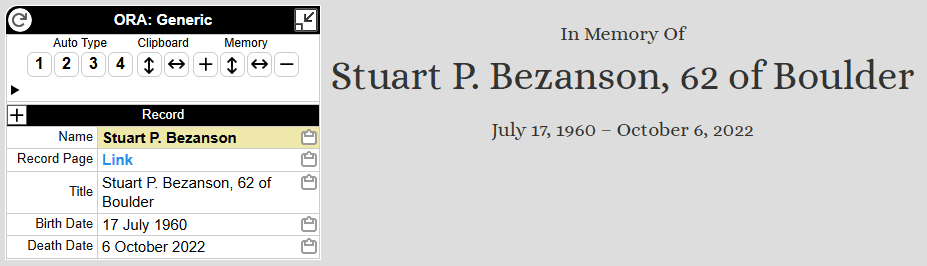
For the example URL, the Text Template will save the text "Stuart P. Bezanson, 62 of Boulder" in the Field named "var.H1". Fields whose names begin with "var." do not appear in the OraPanel, a feature intended to reduce clutter in the OraPanel. If you would prefer to see the value in the OraPanel, remove the "var." prefix, but remember to adjust the name in the subsequent example Text Template.
On the OraSettings page, create a Text Template as follows:
Heading:
Name
Template:
[var.h1:extract:^([^,]+)]
Here's the results of implementing the two text Templates above for the given URL: